
- WD My Passport 0740 Storage device is not detected in the computer. I can imagine the frustration you experience you experience when you are unable to use external hard drive. The issue may occur if drive letter is not assigned, because of settings or if the device is corrupted.
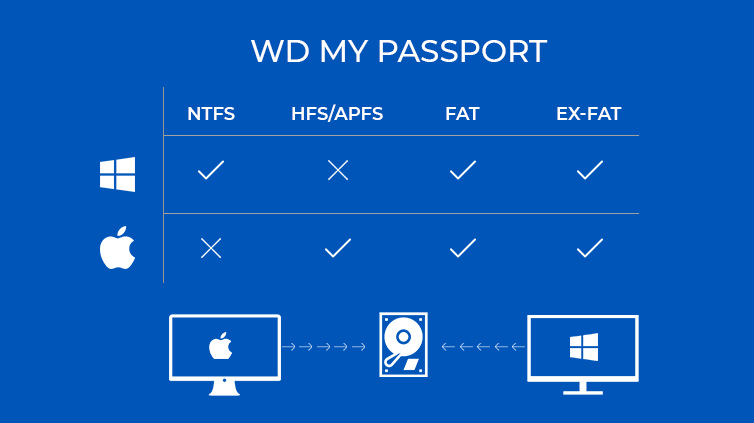
- Once your WD My Passport drive is setup to be shareable for a Mac and a PC you can: 1. Plug the USB cable for the WD My Passport drive into your Mac. Double click on the desktop icon for WD My Passport drive or a shareable partition on that hard drive.
- Dec 08, 2020 Warning: This way will erase all data on the WD external hard drive. Open it, find out the WD external hard drive that you want to format, and right-click the partition on it. Then, choose Format Partition. On this page, you can choose a file system among six options based on your own demand. Here I choose exFAT.
- My Passport For Mac Not Working
- How Do You Format Wd My Passport For Mac
- How To Format Wd My Passport For Mac Ever Insight Login
- How To Use My Passport For Mac
Hello, When I connect hard drive to my PC then it shows just blank (H:) drive and address bar shows content loading. I wait more than 15 to 20 mins but still it display as loading. So When I remove it, then pop-up loads like (you need to format before you use.). You can now proceed to format the WD Passport for Mac. First, connect your WD Passport to your computer. Go to the Disk Utility window and select Applications/Utilities. Select the WD Passport device on the left.
how to format my WD My Passport for Mac on to windows 10 repair tool fix to do data recovery, best western digital data recovery software help you recover MS word,excel, pictures, music, video files from how to format my WD My Passport for Mac on to windows 10
Use 'unformat' to recover data from how to format my WD My Passport for Mac on to windows 10 laptop after quick format,full format,accidentally formatted,reformatting,High-level formatting,Low-level formatting.
Use 'recover partition' to recover files from how to format my WD My Passport for Mac on to windows 10 laptop partition,lost partition,changed ,damaged partition.And if the size or position of partition is changed by format,It can not recover with 'unformat'so you can use 'recover partition'mode.
Use 'undelete' to recover deleted files from how to format my WD My Passport for Mac on to windows 10 laptop after Virus attack,Recycle bin clear,disk cleanup,Press shift del by mistake,permanently empty recycle bin,shift delete ,accidentally deleted by a mistake.
Use 'Full Scan' to recover data from how to format my WD My Passport for Mac on to windows 10 which can not be found with 'undelete' and 'unformat' and 'recover partition',after showing an error,display as raw file system,unformatted,unknown partition,unpartitioned,needs to be formatted,or the file system is not exfat,not fat32,not ntfs.
'how to format my WD My Passport for Mac on to windows 10' ,I have a WD My Passport for Mac. I used to have a Macbook Air so it would always read the devise cause i guess it was formatted just for Mac. I sold my Mac and bout a windows computer. So how do i get to see my files from my external hard drive on my PC
Aidfile Recovery Software Keyfeature
support FAT32 EXFAT NTFS and RAW file system
support Win32 (32 bits) and Win64 (64 bits)
Support Windows XP, Windows 8, Windows 8.1,Windows Vista, Windows 2003, 2008, 2012,Windows 10,Windows 7 .
Desktop & laptops Ultrabook:HP Pavilion,HP Compa,Alienware Alpha,Lenovo ThinkCentre,Lenovo IdeaCentre,Dell Inspiron,Dell XPS,Sony VAIO,Acer Aspire,Asus Transformer,Dell Latitude,Samsung Ativ Book,Asus VivoBook,HP Envy,Lenovo IBM ThinkPad,Lenovo IdeaPad Yoga,Microsoft Surface,Toshiba Satellite
MS Office document (Word, Excel, PowerPoint, Outlook) types (doc, docx, ppt, pptx, xls, xlsx, pst, etc.),photos (JPG, PNG, ICON, TIF, BMP, RAF, CR2, etc.), videos and audios (MPG, MP4, MP3, MTS, M2TS, 3GP, AVI, MOV, RM, RMVB, etc.), compressed files (rar, zip, etc.), PE files (exe, dll, lib, etc.) and so on.
Data recovery how to format my WD My Passport for Mac on to windows 10
Software Manual >>
Relate Articles
Download WD Quick Formatter Alternative to Format External Hard Drive
- 1. Launch EaseUS Partition Master - WD Quick Formatter alternative, right-click the partition on your external hard drive and choose the Format option.
- 2. Assign a new partition label, file system, and cluster size to the selected partition, then click OK.
- 3. Click the Execute Operation button in the top-left corner to review the changes, then click Apply to start formatting your WD hard drive.
- Part 1. How to Reformat WD External Hard Drive Using WD Quick Formatter
- Part 2. Format Wd External Hard Drive Using Easeus Free Partition Software
Everything About Wd Quick Formatter - Wd External Hard Drive Format Tool
WD Quick Formatter, also called WD advanced format utility is a tool that allows you to reformat WD external hard drive to NTFS, FAT32, etc in Windows 10/8/7 or other Windows versions. It is usually used to repair corrupted hard disk when it is unrecognized or inaccessible, fix format issues when Windows was unable to complete the format, change file system, or optimize the performance of the drive. The WD Quick Formatter is ONLY for external drives. Once the WD Quick Formatter is finished reformatting the drive, the drive will only have one partition. This is necessary in order to optimize the performance of the drive.
Part 1. How to Reformat WD External Hard Drive Using WD Quick Formatter
WD Quick Formatter is available on the Western Digital official website. You can use it to repair a corrupted external hard disk. The typical symptoms - the power LED is on but the drive is not accessible. Meanwhile, you'll receive error messages like:
- You need to format the disk before you can use it.
- Drive X: is not accessible. Access is denied.
My Passport For Mac Not Working
The most effortless way is to format the external hard drive if you want to get access to the drive. Follow the steps below to format the external hard drives with WD Quick Formatter.
Step 1. Connect WD external hard drive to your Windows PC. Download and run the WD Quick Formatter.
Step 2. In the welcome screen, click 'Continue' to move to the next screen.
Step 3. In the End User License Agreement page, click 'Accept'.
Step 4. Next, the WD Quick Formatter tool will scan for WD external drives to be formatted.
If the drive is to be used with a computer running Windows system like XP, then select XP Compatible. It is the same case with Windows 10/8/7. And if the drive is not to be used with Windows OS, then select Factory Default. Once this selection is made, click on the drop-down menu to view and/or select different external drives from the list, should there be additional drives connected to the system. When ready, click 'Format Drive'.
Step 5. Once the Format is completed, click the 'Format Another Drive' button to select another WD external drive to format, or click the 'Exit' button to exit the program.
Also read:How to Format WD My Passport for Mac and PC
Part 2. Format Wd External Hard Drive Using Easeus Free Partition Software
However, WD Quick Formatter might fail to format WD external hard drive due to some errors. When it happens, a reliable external hard drive formatter alternative - EaseUS free partition tool is needed. Many users have used this tool to complete the disk formatting job in Windows 10/8/7 while WD external drive format failed with the WD Quick Formatter tool.
Step 1. Launch EaseUS Partition Master, right-click the partition on your external hard drive/USB/SD card which you want to format and choose the 'Format' option.
Step 2. Assign a new partition label, file system (NTFS/FAT32/EXT2/EXT3), and cluster size to the selected partition, then click 'OK'.
Step 3. In the Warning window, click 'OK' to continue.
Step 4. Click the 'Execute Operation' button in the top-left corner to review the changes, then click 'Apply' to start formatting your external hard drive/USB/SD card.
Conclusion
You can always format the wanted drive with WD Quick Formatter. If WD Quick Formatter failed in formatting external drive, try WD Quick Formatter alternative - EaseUS Partition Master. You can easily format your HDD, SSD, SD card, or USB drive for free. You can learn more in the table below.
| Comparison | EaseUS Partition Master | WD Quick Formatter |
|---|---|---|
| Supported Device | HDD, SSD, external hard drive, USB, SD card, etc | Only external hard drive |
| Supported Operating Systems | Windows XP - Windows 10 | macOS 10.5-10.9 &Windows XP/2000 |
| Interface | New and user-friendly | old-fashioned |
| Easiness | Very easy | A little bit hard |
| Other features | Partition a hard drive, migrate OS, wipe data, clone a hard drive | / |
WD Format Tool Frequently Asked Questions
If you have other questions about the Western Digital format tool, you can read the questions and answers below.
How do I check my WD firmware version?
Your firmware version can be found by going to the device's web interface and looking for the Firmware section.
How Do You Format Wd My Passport For Mac
How do I reformat a WD external hard drive on Mac?
Step 1. Connect WD My Passport to your Mac.
Step 2. Once that's done, double left-click on the Mac HD, the internal Mac hard drive visible on the top-right corner of the desktop screen.Select 'Applications > Utilities > Disk Utility'.
Step 3. Select your WD My Passport on the sidebar, choose 'Erase'.
Step 4. Rename the drive, select the 'Volume Format' drop-down list and choose 'MS-DOS (FAT)' or 'ex-FAT File System'. Then click 'Erase'.
How do I update my WD firmware?
- 1. Select your Current Firmware, connect the computer to the My Passport Wireless Wi-Fi network.
- 2. Using a web browser, open the My Passport Wireless dashboard.
- 3. Go to Firmware Tab.
- 4. Under the section Auto Update.
- 5. You will see a pop up confirming to upgrade your firmware, click OK.
How do I format my WD external hard drive for Windows 10?
Step 1. Open Windows File Explorer, locate and right-click on WD My Passport that you need to format, select 'Format'.
Step 2. Rename the drive, reset its file system to FAT32 or exFAT.
Step 3. Click 'Start' to begin the formatting.
How To Format Wd My Passport For Mac Ever Insight Login
Which is better exFAT or NTFS?
How To Use My Passport For Mac
NTFS is ideal for internal drives, while exFAT is generally ideal for flash drives. Both of them have no realistic file-size or partition size limits. If storage devices are not compatible with the NTFS file system and you don't want to limited by FAT32, you can choose the exFAT file system.